Introduction
AIGraph4pg is a tutorial and reference application, implemented with Azure Database for PostgreSQL, for both Graph and AI use-cases. It is an open-source project that customers can learn from, and possibly model their projects based on the provided codebase.
This reference application demonstrates the use of several PostgreSQL extensions including Apache AGE, pgvector, and azure_ai to implement the graph and AI functionality. Apache AGE uses the openCypher graph query language, similar to Neo4j.
Azure OpenAI is used in this application for embeddings generation for vector search, as well as for generative-AI of openCypher queries.
This GitHub repository application contains a curated dataset of USA Legal Cases primarily in Washington state. The dataset nicely demonstrates vector search functionality (i.e. - case descriptions) as well as graph use cases (i.e. - case citations). This dataset is pre-vectorized as the necessary embeddings have already been created by invoking Azure OpenAI.
The curated dataset is used to load one relational table named legal_cases, which contains both embeddings/vector data as well as interesting JSONB data. The dataset also contains a zipped file that can be used to load the corresponding Apache AGE graph, also named "legal_cases".
This application is implemented in Python, and also uses the psql command-line tool. Users of this application are expected to have some familiarity with these tools, and have them installed in on their Windows 11 or macOS workstations/laptops. Setup and use of these are described elsewhere in the docs.
This reference application uses your instance of Azure Database for PostgreSQL, and includes a web application UI that is intended to run on your workstation or laptop. The web app can be executed locally either as a Python process or as a public Docker image available on DockerHub. Some console app functionality is also available in Python file main.py.
Each page in the web application demonstrates specific topics (i.e. - Administrative queries, SQL queries, SQL JSONB queries, Graph queries, Vector Search, etc.). Each page contains a Library icon that can be clicked to display context-sensitive tutorial content on that topic. You can then click the Library icon again to return to the functional non-tutorial page.
These topics are presented in a left-to-right manner in the Top Navigation area of each page, with each topic building on the previous page.
The following image shows this Top Navigation UI, along with the Library icon.

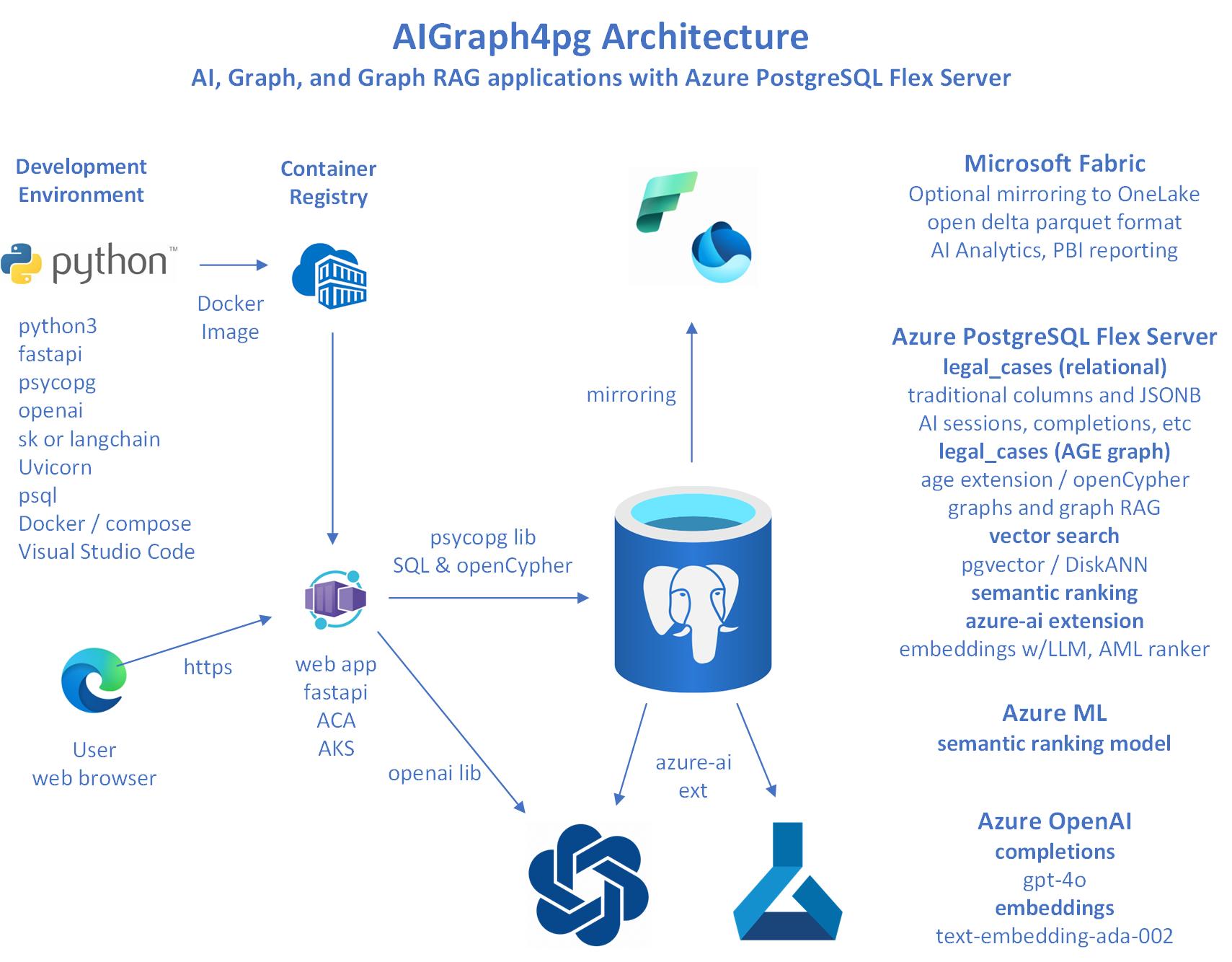
Architecture
Documentation Links
This reference implemention is primarily built upon the Azure PaaS services and open-source software listed below:
- Azure Database for PostgreSQL - Flexible Server
- Apache AGE Graph Database
- openCypher language
- Azure OpenAI
- Python and software libraries hosted a the The Python Package Index (PyPI)
Next Steps
The context-sensitive tutorial content is embedded into the web application that runs locally on your workstation/laptop. See it by clicking the books icon on the Top-Nav.
The Frequently Asked Questions (FAQ) page may answer some of your questions about Azure PostgreSQL and this reference application.
Directory Structure of this GitHub Repository
Directory/File             Description

├── az                     az CLI deployment script for Azure PostgreSQL
├── data
│   └── legal_cases        Zipped curated dataset files for both relational and graph data
├── docs                   User documentation
└── python                 The Python-based implementation
    ├── config             Contains file sample_queries.txt, used by the Web UI
    ├── sql                Miscellaneous SQL, DDL, indexing scripts
    ├── src                The primary Python source code
    ├── static             Static assets used in the Web app
    ├── templates          Jinja2 templates used in text generation
    ├── tests              Unit tests
    ├── views              Web app HTML views/templates, including tutorial_<topic>.html pages
    ├── main.py            The "console app" part of this application
    ├── requirements.in    The base list of Python requirements, used by venv.ps1/venv.sh
    ├── venv.ps1           Windows PowerShell script to create the Python virtual environment
    ├── venv.sh            Linux/macOS script to create the Python virtual environment
    ├── webapp.py          The Web application, built with the FastAPI framework
    ├── webapp.ps1         Windows PowerShell script to start the Web app
    └── webapp.sh          Linux/macOS script to start the Web app